macOS doesn’t have a system-wide parametric EQ. So I built one in a day.
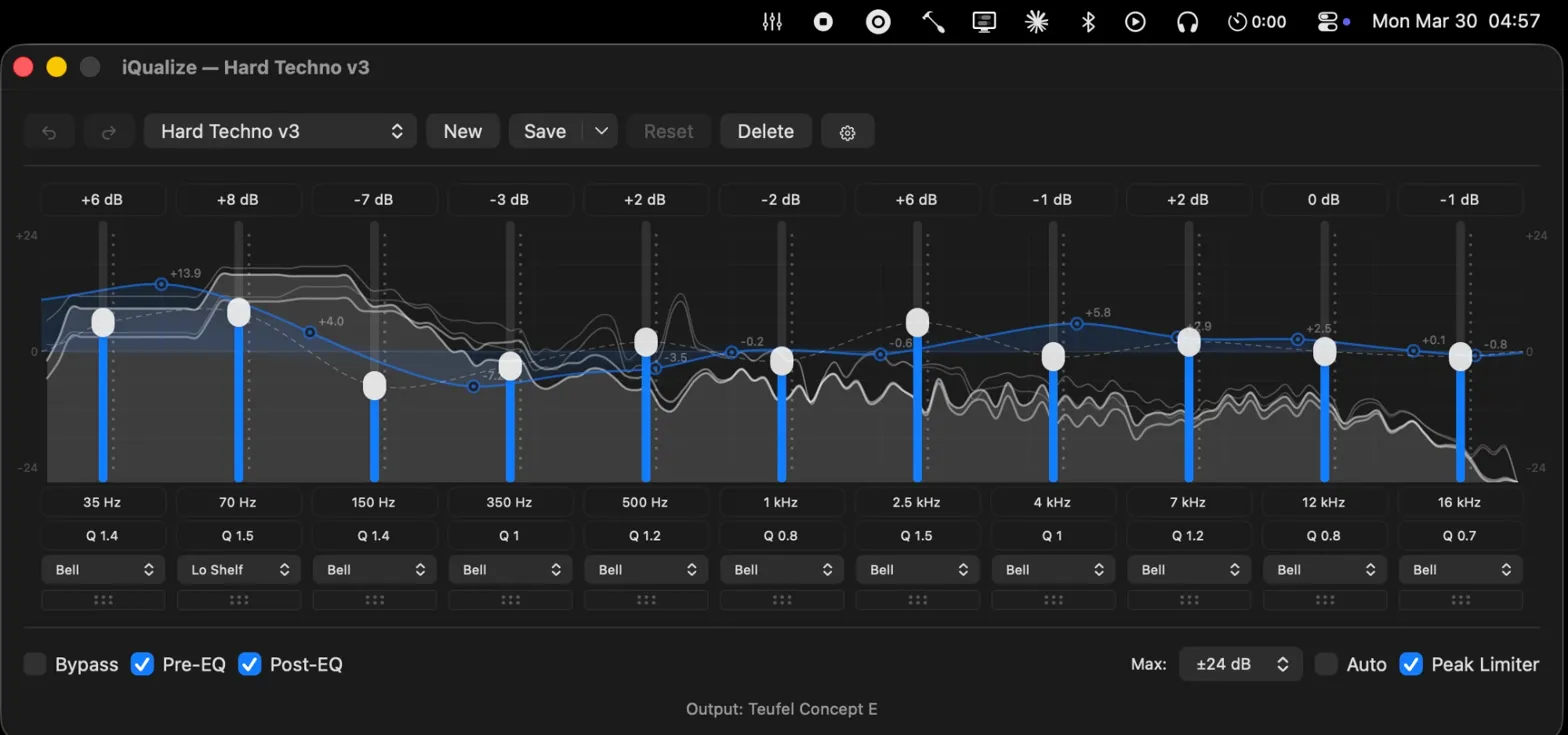
It was 04:57 in Bavaria. I was listening to Opera by Ballarak on a Teufel Concept E 5.1. That’s the only explanation you need for why iQualize exists.
No subscriptions. No virtual audio drivers. No Electron app eating 400 MB of RAM to draw a frequency curve. Just Swift, CoreAudio, and a CATap doing what they should’ve always done.
The problem
macOS has no built-in system-wide EQ. Apple gives you a volume slider and a balance knob. If you want to shape your audio — cut a harsh 4 kHz peak on your headphones, add warmth to flat studio monitors, or tame the bass on cheap speakers — you’re on your own.
So I went looking. Every EQ app I found had a “Pro” version. I tried a few — none of them felt right. The closest one to usable had a cluttered UI and everywhere you looked there was a reminder that you didn’t have Pro. It felt like the app was designed to sell you an upgrade, not to equalize your audio.
And the whole time I kept thinking: on Linux, this is a non-problem. EasyEffects gives you a full parametric EQ, system-wide, for free. It just works. I’d grown to love how simple it was. So the question became: how hard can it really be to build an equalizer? It’s just some sliders changing values. Right?
Right.
The stack
iQualize is built on two commitments: stay native, stay simple. ~200 KB of Swift, zero external dependencies, and only Apple frameworks.
CATap over virtual drivers
macOS 14.2 introduced CATap — Core Audio Tap. It lets you tap into system audio streams directly through Apple’s own API. No kernel extensions. No virtual audio devices. No unsigned drivers. Just a documented, supported way to intercept and process audio at the system level.
This is the foundation. CATap means iQualize doesn’t break when macOS updates. It doesn’t require disabling SIP. It doesn’t install anything into kernel space. It uses the same audio infrastructure that macOS itself relies on. It even works with Bluetooth headphones and DRM-protected content — because it operates at the same level the OS does.
One subtle requirement: the app has to exclude its own process from the tap. Without that, you get a feedback loop — the app captures its own output, processes it, outputs it again, captures that. The fix is a single CoreAudio property query that translates the app’s PID into a process object and excludes it from the tap configuration. Simple, once you know it exists. The documentation does not make it easy to know it exists.
The signal chain
The processing pipeline has three parallel paths that never interfere with each other:
Capture runs on the real-time CoreAudio IO thread. An aggregate device combines the CATap input with the hardware output. The IO callback reads interleaved audio from the tap and writes it into a lock-free ring buffer.
Processing runs on AVAudioEngine. A source node pulls from the ring buffer, deinterleaves the audio, and applies input gain and stereo balance. From there it flows through the EQ — 31 biquad filter bands, each an independent IIR filter with configurable frequency, gain, Q factor, and one of seven filter types. A peak limiter with 7 ms attack and 24 ms decay sits after the EQ to prevent digital clipping. Then output gain, then hardware.
Analysis taps the signal at two points — before and after the EQ — and runs a 2048-point FFT with Hann windowing through Accelerate’s vDSP. The raw 1024 frequency bins get remapped to 128 perceptual bins on a logarithmic scale from 20 Hz to 20 kHz. The spectrum display uses instant attack with exponential decay and a two-second peak hold. It looks like an analog VU meter — responsive to transients, smooth on falloff.
Lock-free everything
The ring buffer between the IO thread and AVAudioEngine is the critical bridge. It’s a single-producer, single-consumer design with power-of-2 capacity — which means the modulo operation is a bitmask, not a division. Read and write heads use 64-bit wrapping arithmetic. No locks, no atomics beyond what ARM64 guarantees for aligned stores.
The spectrum analyzer uses a similar trick: double-buffered data with an index flip. The audio thread writes to the inactive buffer, then swaps the index. The UI thread reads from the active buffer. Worst case, the UI shows one stale frame. At 60 fps, nobody notices.
This matters because the alternative — mutexes in the audio callback — causes dropouts. A lock that blocks for even a millisecond in a real-time audio thread is audible. The entire architecture is designed around never blocking the audio thread for any reason.
The biquad filters
Each EQ band is a Direct Form II Transposed biquad filter. The implementation is textbook DSP, but two details matter in practice:
Coefficients are pre-normalized by dividing through by a0 during setup, not during processing. That saves two divisions per sample per band — across 31 bands at 48 kHz, it adds up.
Denormal flushing. When a filter’s state variables decay toward zero, IEEE 754 floats enter a denormalized range where the CPU switches to a slower processing path. The filter flushes any value below 1e-15 to zero. Without this, a “silent” filter can use more CPU than an active one. It’s the kind of bug you only find with a profiler, and it’s the kind of fix that looks paranoid until you’ve been bitten by it.
The philosophy
iQualize is open source and free. No paywall. No freemium tier. No “pro” unlock.
This is a deliberate choice, not a business oversight. A parametric EQ is not complex software. The math is well-understood — biquad filter coefficients have been published since the 1960s. The hard part is the system integration, not the algorithm. Charging money for a gain curve feels like charging for a calculator app.
The macOS audio ecosystem has a problem: every useful tool is either proprietary, abandoned, or both. Open-source alternatives are rare because the intersection of “macOS developer,” “audio engineer,” and “open-source contributor” is small. I want iQualize to be the tool I wished existed when I started looking. If someone else has the same frustration I had, they should be able to just install it and move on.
The lessons
CoreAudio is powerful and hostile
Apple’s audio stack is incredibly capable. It’s also one of the worst-documented frameworks in the Apple ecosystem. The headers are your documentation. Stack Overflow answers reference APIs that were deprecated three versions ago. WWDC sessions cover the concepts but skip the implementation details you actually need.
I spent more time reading C headers and reverse-engineering behavior from sample code than I spent writing actual audio processing logic. If you’re considering building on CoreAudio, budget your time accordingly.
Real-time audio has different rules
You cannot allocate memory in an audio callback. You cannot take a lock. You cannot call any function that might block. This rules out most of what you’d normally reach for — no arrays that might resize, no dictionaries, no string formatting, no logging.
Everything the audio thread touches has to be pre-allocated. Every communication channel between threads has to be lock-free. Every state update has to be atomic or tolerate staleness. It’s a discipline that web and server development doesn’t prepare you for, because in those contexts, a millisecond of latency is invisible. In audio, a millisecond of latency is a click.
Swift 6’s strict concurrency model actually helps here — it forces you to think about which thread owns which data. But it also means marking real-time state as nonisolated(unsafe) because actor isolation would introduce blocking. You end up fighting the language’s safety guarantees in exactly the places where correctness matters most.
Starting from zero
iQualize was my first Mac app. Not “first Mac app in a while” — first, period. New Mac, new platform, new language. I didn’t evaluate Tauri vs Electron vs AppKit. I didn’t draw architecture diagrams. I opened Xcode and started reading Apple’s documentation.
That context matters because it shaped every decision. I wasn’t choosing Swift over alternatives — Swift was the only thing in front of me. AppKit wasn’t a considered trade-off against web views — it was what macOS apps are built with. The entire stack is native because I had no reason to reach for anything else.
In hindsight, that naivety was an advantage. No framework opinions to import. No instinct to wrap everything in a web view because that’s what I knew. Just the platform, the APIs, and the problem. AppKit gives me custom scroll-wheel sliders for gain adjustment. Keyboard navigation between bands — arrow keys for gain and frequency, Tab to cycle. Text fields that accept typed values or scroll-wheel input. The app sits in the menu bar, opens a window when you click it, and uses under 40 MB of memory. I didn’t have to fight for that simplicity — I just didn’t know enough to overcomplicate it.
Shipping a desktop app is its own skill
Shipping a native desktop app on macOS is a different discipline from anything I’d done before. Code signing. Notarization. DMG packaging. Auto-update mechanisms. Handling different macOS versions.
Then there’s the stuff that only matters for an audio app. System sleep pauses the audio engine — you have to detect wake events and restart processing with a delay, because the audio hardware isn’t ready instantly. Device hotplugging means a user can unplug their headphones mid-session and the app needs to seamlessly switch to speakers without crashing. Bluetooth devices connect and disconnect unpredictably.
None of this is in the “build an app” tutorial. All of it is required for an app that people actually use daily.
What’s next
iQualize works. I use it every day. The parametric EQ is solid, the spectrum analyzer is responsive, and CATap has been stable across macOS updates so far. It ships with 12 presets — everything from flat to genre-specific profiles — and supports custom presets saved as JSON.
What’s left is polish: better onboarding for people who don’t know what Q factor means, import/export for sharing presets, and the small quality-of-life improvements that separate a tool from a product. The core is done. The rest is refinement.
If you’re on macOS and you’ve been through the same cycle of installing and uninstalling EQ apps, give it a try. It’s free, it’s open source, and it doesn’t install a kernel extension on your machine.